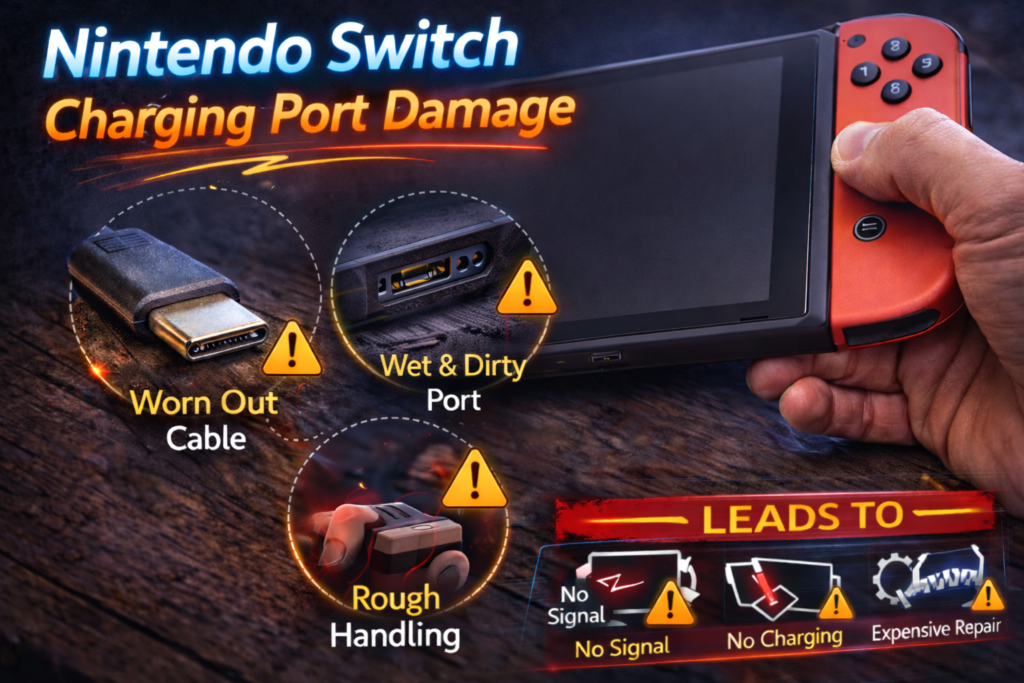
Nintendo Switch Charging Port Damage
Introduction
Charging port damage is one of the most common and disruptive problems Nintendo Switch owners experience. When the Switch won’t charge reliably—or won’t charge at all—the console becomes unusable once the battery drains. For families, travelers, and gamers, this often feels like a sudden failure even though the damage usually develops gradually.
Unlike many phones, the Nintendo Switch relies heavily on its USB-C charging port not only for charging but also for docking, video output, and data transfer. This makes the port one of the most stressed and failure-prone components in the entire system.
This article explains how Nintendo Switch charging port damage happens, why it’s so common, early warning signs most people miss, why DIY fixes often fail, and when professional repair is the only safe solution.
Why the Nintendo Switch Charging Port Is Vulnerable
The Switch’s charging port is used far more aggressively than most device ports because it handles:
- Daily charging
- Docking and undocking
- Power delivery
- Video and audio output
- Data communication
Every time the console is docked or unplugged, mechanical stress is applied to the port. Over time, this stress accumulates.
Design Factors That Increase Risk
- USB-C connector with small internal pins
- Bottom-mounted port, vulnerable when set down while charging
- Dock alignment, which must be precise
- Frequent use by children, increasing force and misalignment
These factors make charging port damage one of the most common Switch hardware failures.
Most Common Causes of Nintendo Switch Charging Port Damage
1. Docking Misalignment (Most Common Cause)
Docking the Switch slightly off-angle can:
- Bend internal pins
- Stress solder joints
- Loosen the port over time
Repeated imperfect docking slowly damages the port even if the console appears fine.
2. Using the Switch While Charging
Playing handheld mode while charging puts constant sideways pressure on the cable and port.
This leads to:
- Bent pins
- Worn internal contacts
- Loose port connection
Over time, charging becomes intermittent and unreliable.
3. Drops While Plugged In
If the Switch is dropped while the charger is connected:
- The cable acts as a lever
- Force transfers directly to the port
- Internal solder joints can crack
This often causes sudden charging failure after a drop.
4. Cheap or Incompatible Chargers
Low-quality USB-C chargers may:
- Deliver unstable voltage
- Fit poorly in the port
- Increase heat and resistance
Poor power delivery accelerates port wear and internal damage.
5. Dust, Lint, and Debris
Pocket lint, dust, and debris collect inside the port.
This can:
- Prevent full cable insertion
- Cause poor electrical contact
- Mimic port failure symptoms
Over time, debris contributes to real damage.
6. Liquid Exposure
Even minor liquid exposure can:
- Corrode USB-C pins
- Damage internal traces
- Cause delayed charging failure
Liquid damage often worsens weeks after exposure.
Early Warning Signs of Charging Port Damage
Charging port damage rarely happens instantly. Watch for:
- Charging only at certain angles
- Charger feeling loose
- Charging disconnecting randomly
- Switch charging slowly or inconsistently
- Dock not recognizing the console
- No display output when docked
These symptoms almost always get worse if ignored.
“Switch Won’t Charge” vs “Switch Charges Sometimes”
Understanding the difference helps identify port damage.
Charges Sometimes
This usually means:
- Bent pins
- Worn contacts
- Cracked solder joints
The port is failing but not completely broken.
Won’t Charge at All
This often indicates:
- Severe pin damage
- Port detachment from the board
- Corrosion or internal break
At this stage, repair is urgent.
Why Cleaning the Port Is Not Always Enough
Many people attempt:
- Toothpicks
- Paperclips
- Compressed air
While cleaning can help if debris is the only issue, it often:
- Pushes debris deeper
- Bends pins
- Causes short circuits
If symptoms persist after gentle cleaning, the port is damaged—not dirty.
Common Myths About Switch Charging Port Problems
Myth 1: “It’s Just the Charger”
If multiple chargers behave the same way, the port is the issue.
Myth 2: “Wireless Charging Can Replace It”
The Switch does not support wireless charging.
Myth 3: “It Will Fix Itself”
Charging port damage always worsens over time.
Myth 4: “Dock Issues Aren’t Related”
Dock failure is often a symptom of port damage.
Why Charging Port Damage Affects Docking and TV Output
The USB-C port carries:
- Power
- Video signal
- Audio signal
- Data
If pins are damaged:
- TV output fails
- Dock LEDs may flash
- Console charges but won’t display
This often leads people to suspect the dock when the port is the real problem.
DIY Charging Port Repair: Why It’s Risky
Online videos often suggest:
- Heating the port
- Bending pins back
- Reflowing solder without proper tools
These attempts frequently cause:
- Board damage
- Lifted solder pads
- Permanent motherboard failure
USB-C port replacement requires precision tools and experience.
How Professionals Repair Nintendo Switch Charging Ports
Professional repair involves:
- Diagnostic testing to confirm port failure
- Microscopic inspection of pins and solder joints
- Safe port removal without damaging the board
- OEM-grade USB-C port installation
- Reinforced solder connections
- Charging and docking verification
This restores full charging, docking, and display functionality.
Can Charging Port Damage Affect the Battery?
Yes. A damaged port can:
- Deliver unstable power
- Cause improper charging cycles
- Lead to battery degradation
Fixing the port early protects the battery from secondary damage.
How Long a Repaired Charging Port Lasts
With proper repair:
- Charging ports last years
- Docking works normally
- Charging stability is restored
Longevity depends on improved usage habits after repair.
How to Prevent Future Charging Port Damage
After repair:
- Dock slowly and carefully
- Avoid playing while charging
- Use high-quality chargers
- Keep the port clean and dry
- Don’t force cables
These steps significantly reduce repeat damage.
When to Seek Repair Immediately
Do not wait if:
- The Switch will not charge
- Docking no longer works
- Charging only works at an angle
- The console is used daily
- Kids rely on the device
Delaying repair increases cost and risk of board damage.
Learn more about Nintendo Switch Repair
Repair vs Replacement: What Makes Sense?
Charging port repair is almost always cheaper than:
- Replacing the entire console
- Losing game saves or data
- Buying a new Switch
Replacement should only be considered if multiple major components have failed.
Final Takeaway
Nintendo Switch charging port damage is extremely common due to docking stress, frequent use, and the delicate USB-C design. What starts as intermittent charging almost always progresses to complete failure if ignored. While cleaning and cable changes may help briefly, professional charging port repair is the only reliable long-term solution once damage occurs. Early repair restores charging, docking, and display output and prevents costly motherboard damage.
Nintendo Switch Charging Port Damage? Contact Us Now!