Touchscreen Works Sometimes
Introduction
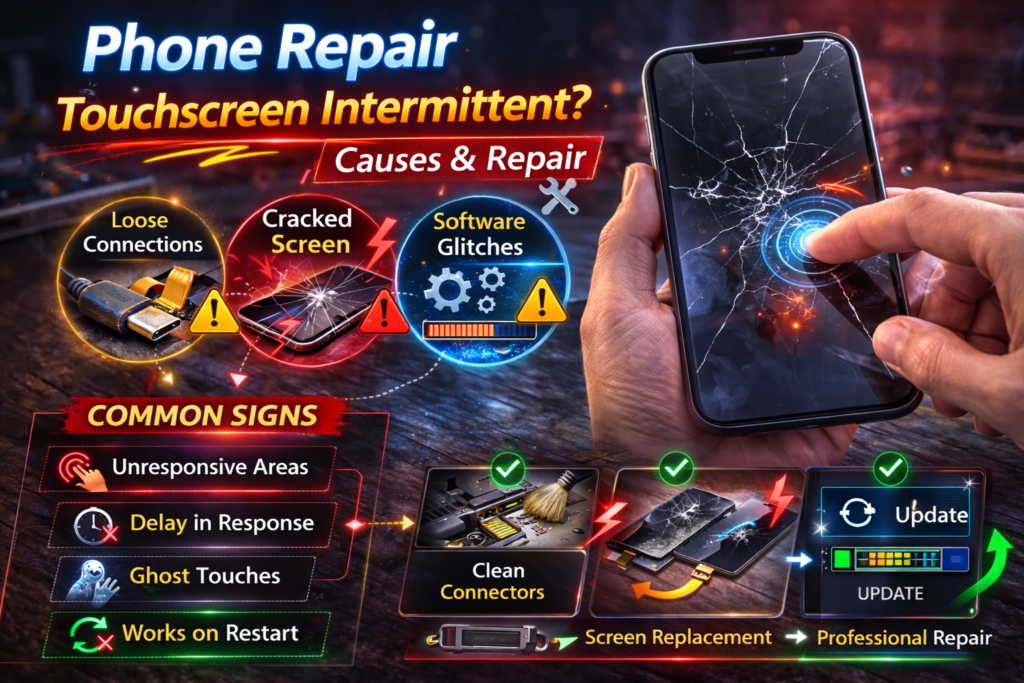
A touchscreen that works only sometimes is one of the most misleading phone problems. The device may respond perfectly one moment, then suddenly ignore taps, miss swipes, or stop responding altogether. Many users in St. Charles assume this is a software glitch or something that will resolve on its own.
We frequently see this issue in customers near Zumbehl Road and the Mid Rivers Mall who delayed repair because the phone appeared usable. In reality, intermittent touch response is almost always a hardware issue.
It is a strong warning sign that the touchscreen digitizer or its internal connections are failing. While the phone may still function for now, the problem nearly always worsens with time. This article explains why a touchscreen works inconsistently, what causes the behavior, how the issue progresses, and when professional repair is the only reliable solution.
What “Touchscreen Works Sometimes” Really Means
Intermittent touch response means the digitizer is not consistently detecting input.
This often appears as:
- Touch working in some apps but not others
- Certain areas of the screen not responding
- Touch working after locking and unlocking the phone
- Touch registering only when pressing harder
- Touch stopping when the phone warms up
This inconsistency is not normal and indicates internal screen failure.
How Phone Touchscreens Detect Input
Touchscreens rely on a digitizer layer bonded directly to the display. The digitizer uses an electrical grid to sense changes when your finger touches the glass.
For touch to work correctly:
- The digitizer grid must be intact
- Electrical signals must flow evenly
- Flex cables must remain securely connected
- The frame must hold the screen in proper alignment
If any part of this system is compromised, touch becomes unreliable.
Most Common Causes of Intermittent Touch Issues
1. Partial Digitizer Damage
This is the most common cause. Drops or pressure damage can partially break the digitizer grid.
Results include:
- Touch working only in certain areas
- Dead zones appearing and disappearing
- Touch failing during specific gestures
Over time, these damaged areas expand and become permanent.
2. Loose or Stressed Internal Screen Connector
The screen connects to the motherboard using thin flex cables. Impact or pressure can loosen or stress these connections.
Common symptoms include:
- Touch working when the phone is tilted
- Touch failing after movement
- Touch returning briefly after restarting
This requires internal repair and cannot be fixed through software.
3. Cracked Screen, Even Minor Cracks
Even small cracks affect how the digitizer reads touch input.
Cracks cause:
- Uneven pressure distribution
- Electrical signal interference
- Moisture intrusion
Intermittent touch is often the first visible symptom of a cracked screen.
4. Moisture or Humidity Exposure
Moisture interferes with the digitizer’s electrical signals.
This can occur from:
- Sweat
- Rain
- High humidity
- Minor spills
Moisture damage often causes touch to fail sporadically before complete failure occurs.
5. Frame Bending or Pressure Damage
A slightly bent frame places uneven stress on the screen.
This leads to:
- Touch working better in certain positions
- Touch failure when pressure is applied
- Gradual loss of responsiveness
6. Low-Quality Replacement Screen
If the phone was repaired previously, a low-quality screen may be responsible.
Poor replacement screens often cause:
- Inconsistent touch sensitivity
- Lag
- Random dead zones
OEM-grade screens are designed to prevent these issues.
Why Intermittent Touch Gets Worse Over Time
Intermittent touch almost never stays stable.
It worsens because:
- Micro-cracks continue to spread
- Moisture corrosion progresses
- Flex cables loosen further
- Frame stress increases during daily use
What works “sometimes” eventually stops working entirely.
Can Software Cause Intermittent Touch?
Software issues may cause brief lag, but they do not create dead zones or pressure-dependent touch failure.
If the problem:
- Persists after restarting
- Happens across multiple apps
- Started after a drop, crack, or moisture exposure
The cause is hardware, not software.
Early Warning Signs Touch Failure Is Approaching
Before full failure, many users notice:
- Touch inconsistency increasing daily
- Certain areas becoming completely unresponsive
- Touch working only after repeated presses
- Touch failure while charging or warming up
These signs indicate escalating digitizer damage.
Is Your Data at Risk?
In most cases, your data is safe.
Because the phone is still powered on:
- Photos and videos remain intact
- Contacts and messages are unaffected
- Apps and system data remain stored
Screen replacement does not erase data. Risk increases only if moisture or further internal damage occurs.
Why Screen Replacement Is Usually the Fix
Because the digitizer is bonded to the display, partial failures cannot be repaired.
Professional screen replacement:
- Removes the failing digitizer
- Restores consistent touch response
- Prevents sudden total touch failure
- Protects internal components
Waiting increases the risk of complete touch loss.
👉 Learn more about Screen Replacement in St. Charles
What Happens During Professional Repair
A professional repair includes:
- Diagnostic testing
- Inspection for frame damage
- Safe screen removal
- OEM-grade screen installation
- Touch calibration and accuracy testing
This restores full reliability.
When to Replace the Screen Immediately
Seek repair right away if:
- Touch fails randomly
- Certain areas stop responding
- Touch only works with pressure
- The phone is needed daily for work or communication
Early repair prevents more expensive damage.
Intermittent Touch Repair in St. Charles, MO
At Phone Factory in St. Charles, intermittent touchscreen issues are diagnosed and repaired daily. High-quality replacement screens restore consistent performance and long-term reliability for customers throughout St. Charles, including areas near Zumbehl Road and Mid Rivers Mall.
Related Services
Final Takeaway
A touchscreen that works only sometimes is a strong warning sign of internal screen failure. While the phone may still be usable, the problem will continue to worsen without repair.
Professional screen replacement restores consistency, accuracy, and reliability, preventing complete touch failure.
Touchscreen not working properly? Contact us now!