Why iPhone screen not responding to touch?

Few phone problems are more frustrating than an iPhone screen that stops responding to touch. You tap, swipe, and scroll, but nothing happens, or only part of the screen works. In St. Charles, this is one of the most common reasons people visit a local phone repair shop, especially for residents near Zumbehl Road and the Mid Rivers Mall area.
Touch issues are rarely random. In almost every case, the problem is tied to physical damage, internal screen failure, or pressure-related stress inside the device. Even when the glass looks fine, the touchscreen system underneath may already be compromised.
This guide explains why an iPhone screen stops responding to touch, what causes it, how the problem progresses, and when professional screen replacement is the only reliable fix.
Why iPhone Screens Stop Responding to Touch
An iPhone screen usually stops responding to touch because the digitizer layer inside the display has been damaged. This commonly happens after drops, pressure damage, moisture exposure, or internal screen failure. In most cases, restarting the phone or updating software will not fix the issue, and the correct solution is replacing the screen assembly.
How the iPhone Touchscreen Actually Works
An iPhone screen is made up of several bonded layers that work together:
- Outer glass layer
- Digitizer that detects touch input
- Display panel (OLED or LCD)
- Adhesive bonding layers
- Flex cables connecting the screen to the logic board
When you touch the screen, the digitizer detects electrical changes from your finger and sends that signal to the phone’s processor. If any layer in this system is damaged, touch response becomes delayed, inaccurate, or stops entirely.
Most Common Reasons an iPhone Screen Stops Responding to Touch
1. Drop or Impact Damage
The most common cause of touch failure is impact damage. Even a short drop can damage the digitizer without cracking the glass.
Common symptoms include:
- Partial touch response
- Dead zones on the screen
- Touch working only near the edges
- Delayed or inconsistent response
This type of damage often worsens over time as internal fractures spread.
2. Pressure Damage From Sitting or Bending
Pressure damage is extremely common and often overlooked. Sitting on an iPhone, keeping it in a tight pocket, or placing it under heavy objects can separate internal screen layers.
Pressure-related issues often cause:
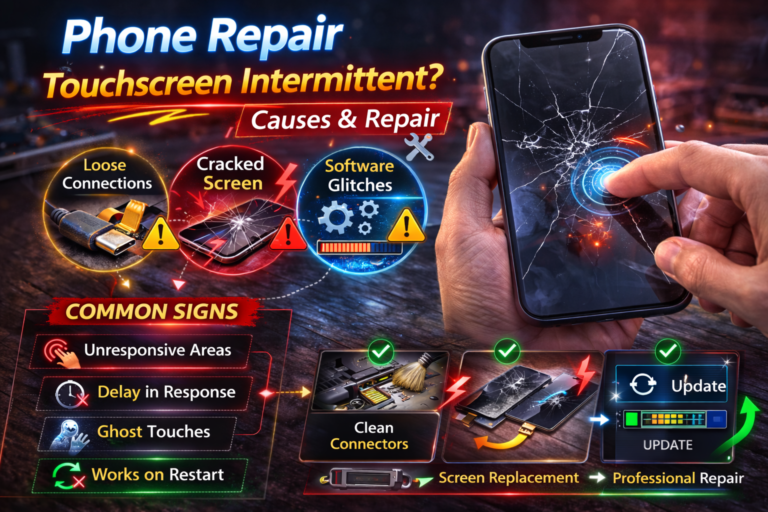
- Intermittent touch response
- Touch working only when pressing harder
- Failure in the center of the screen
Once pressure damage occurs, it does not resolve on its own.
3. Moisture or Liquid Exposure
You do not need to drop your phone in water for liquid damage to occur. Moisture from rain, sweat, spills, or even humidity can interfere with the digitizer signal.
Liquid exposure can:
- Corrode screen connectors
- Cause delayed response
- Lead to complete touch failure over time
4. Cracked Screen, Even Small Cracks
A cracked screen almost always leads to touch problems eventually. Cracks allow dust, pressure, and moisture to reach the digitizer layer.
Over time, you may notice:
- Areas that stop responding
- Random touch inputs
- Ghost touch behavior
If your glass is cracked, professional iPhone screen repair is the safest solution before deeper damage occurs.
👉 Learn more about iPhone Screen Repair in St. Charles
5. Low-Quality or Failing Replacement Screens
If your iPhone was repaired previously, a low-quality screen may be the cause of touch issues.
Common problems with poor replacement screens include:
- Inaccurate or laggy touch response
- Dead zones
- Short lifespan
OEM-grade or premium-quality replacements restore proper sensitivity and reliability.
👉 View our Screen Replacement Service for full details.
6. Internal Connector or Logic Board Damage
In rare cases, touch issues originate from internal flex cables or the logic board itself. This usually happens after severe impact, liquid exposure, or improper past repairs.
A professional diagnostic is required to confirm this type of issue.
Early Warning Signs Touch Failure Is Getting Worse
Many users notice subtle issues before complete failure occurs. Watch for:
- Touch working only part of the time
- Certain apps becoming harder to use
- Keyboard missing letters
- Swipes not registering consistently
- Slower response than normal
Ignoring these signs often leads to full screen failure.
Can Software Cause Touch Problems?
In most cases, no. Software issues rarely cause persistent touch failure.
A restart or update may help if:
- The phone temporarily freezes
- An app crashes repeatedly
If touch problems continue across apps or after restarting, the issue is almost always hardware-related.
Why Screen Replacement Is Usually the Correct Fix
Because the digitizer is fused to the display, touch problems require replacing the entire screen assembly.
A proper screen replacement:
- Restores full touch sensitivity
- Eliminates dead zones
- Prevents moisture intrusion
- Protects internal components
Temporary fixes do not last and often lead to further damage.
What Happens During Professional iPhone Screen Repair
A professional repair includes:
- Full device inspection
- Safe removal of the damaged screen
- Installation of an OEM-grade replacement
- Proper alignment and sealing
- Touch calibration and testing
This process ensures long-term reliability.
Why Early Repair Matters
Delaying screen repair can result in:
- Complete screen failure
- Damage to internal components
- Battery swelling from internal pressure
- Higher repair costs later
Early replacement protects your phone and saves money.
iPhone Screen Repair in St. Charles, MO
If your iPhone screen is not responding to touch, it is a clear sign the display assembly is failing. At Phone Factory in St. Charles, we accurately diagnose the issue and restore full functionality using high-quality replacement parts.
Whether your screen stopped responding after a drop, pressure damage, or moisture exposure, professional repair is the safest and most reliable solution for residents near Zumbehl Road, Mid Rivers Mall, and surrounding neighborhoods.
Related Services
Final Takeaway
An iPhone screen that does not respond to touch is almost always suffering from internal screen damage. While the phone may still turn on and function partially, the problem will continue to worsen without repair.
Replacing the screen restores full usability, protects internal components, and prevents more expensive damage down the line.